
In this article
- What live captioning (speech-to-text) services are
- How CART differs from TypeWell, C-Print, and notetakers
- Where AI captions fit in
- How to request captioning, and how to choose
- What organizers, teachers, and coworkers can do
- Living in Japan? How Japan’s yoyaku-hikki works
When hearing aids aren’t enough for a lecture, a meeting, or a medical appointment, text can fill the gap. In a live captioning service, a trained person listens and types, and the words appear on a screen as people talk.
There are two main styles. Verbatim services such as CART type nearly every word. Meaning-for-meaning services such as TypeWell and C-Print condense the speech into clear, shorter text. Neither is better for everyone. Which one works depends on you and the situation.
This guide explains the differences, how to ask for the service you need, and how the people around you can help it work well.
- What Is Live Captioning?
- Verbatim vs. Meaning-for-Meaning: The Key Difference
- The Main Services at a Glance
- What About AI Captions and Speech-to-Text Apps?
- How to Choose
- How to Request Live Captioning
- How Others Can Help: Organizers, Teachers, and Coworkers
- Living in Japan? How Yoyaku-Hikki Works
- Frequently Asked Questions
- Summary
- References
What Is Live Captioning?
Live captioning, also called speech-to-text, turns spoken words into text in real time. A person (or sometimes a team) types, and you read the text on a laptop, tablet, or large screen. It can be on-site or remote.
It is mostly used by people with hearing loss who don’t use sign language. That includes many people who grew up hearing and lost hearing later, and people who use hearing aids but still struggle in classrooms, large rooms, or group discussions. If you are new to the topic, our guide to what hearing loss is is a good place to start.
Some people with auditory processing difficulties also find live text helpful, and so do people listening in a second language or in a noisy room.

Verbatim vs. Meaning-for-Meaning: The Key Difference
Here is the difference using one sentence. Say the speaker says:
So, um, what I wanted to say is, we should, uh, probably move the deadline to Friday.
- Verbatim captions show nearly every word, including filler sounds like um and uh.
- Meaning-for-meaning captions show the idea: We should move the deadline to Friday.
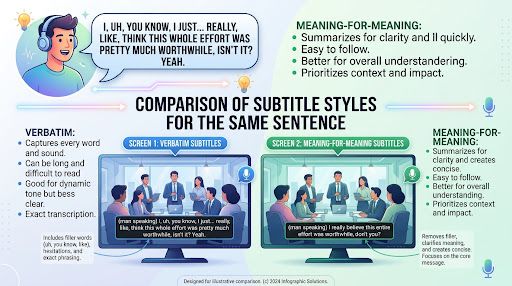
Verbatim is great if you want to see everything. But a lot of text moves fast. The Described and Captioned Media Program (DCMP) notes that an hour of lecture produces roughly 25 pages of transcript with verbatim captioning and roughly 15 with meaning-for-meaning. Some people find the shorter, cleaner text easier to follow. Others want every word, especially in classes where exact terms matter.
The Main Services at a Glance
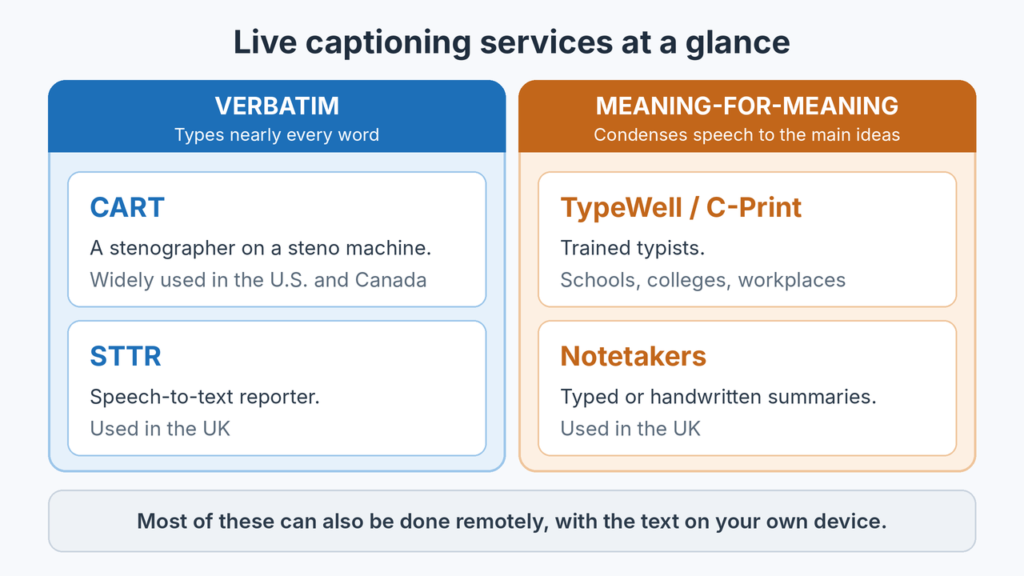
CART (Communication Access Realtime Translation)
A stenographer types on a steno machine, and software turns the keystrokes into text. It is verbatim. CART is widely used in the U.S. and Canada for classes, conferences, and meetings. It takes years of training, so the provider pool is smaller and the hourly cost is usually higher.
TypeWell and C-Print
Specially trained typists use text-condensing methods to type the meaning of what is said. These are meaning-for-meaning services, used a lot in schools and colleges, and also in workplaces. Many providers can send you a copy of the text afterward.
Speech-to-text reporters (STTRs) in the UK
Also called palantypists or stenographers, STTRs produce a verbatim account, using a special keyboard. The Royal National Institute for Deaf People (RNID) says the text is usually about 95% correct, with remaining words spelled roughly as they sound.
Notetakers
In the UK, electronic notetakers type a condensed summary on a laptop, so they are closer to TypeWell than to CART. Manual notetakers write notes by hand. Neither gives a word-for-word record.
Remote options
Most of these services can be done remotely. The captioner joins by video call or audio, and the text appears on your own device. This is handy for online meetings and when no local provider is available.
What About AI Captions and Speech-to-Text Apps?
Automatic captions in video calls and phone apps are free, fast, and available any time. They are handy for casual chats, short questions, or when nothing else is available.
They can struggle with accents, several people talking at once, background noise, names, and technical words. Some advocacy groups, such as the National Association of the Deaf (NAD) in the U.S., say automatic captioning alone is often not reliable enough to give effective communication in important situations.
A practical way to think about it: use AI captions as a handy backup, and ask for a trained person when the situation matters (a medical appointment, a job interview, an important class or meeting). You can use both. For example, you can switch on an app as a backup in a meeting.
How to Choose
There is no best service for every situation or every person. DCMP gives a clear example: a student might want verbatim captioning in a history class, meaning-for-meaning in a sociology class, and a sign language interpreter for a math class.
A few questions can help you decide:
- Do you want every word, or the main points? If a lot of text overwhelms you, meaning-for-meaning may feel easier. If you want exact wording, choose verbatim.
- Is it mostly one speaker, or a discussion? A fast discussion with many people is hard for any captioner. Ask what the provider recommends.
- Do you need a transcript afterward? Most providers can produce one, but ask. A transcript is not a replacement for notes. It can miss what is on slides or boards.
- Do you use sign language? If you do, a sign language interpreter may suit you better. Live captioning is mostly for people who read text more comfortably than they follow sign.
If you aren’t sure, try one service in a lower-stakes setting first, and tell the provider what worked and what didn’t.
How to Request Live Captioning
Rules differ by country. Here are two common examples. For other countries, ask a disability office, your school, your employer, or the event organizer.
In the United States
Under the Americans with Disabilities Act (ADA), state and local governments, businesses, and nonprofits that serve the public must provide communication aids so people with hearing loss can take part. The ADA lists real-time captioning, also called CART, among the aids. Government entities must give primary consideration to the aid you request. Businesses and nonprofits are encouraged to consult you about what works.
At work, you can ask your employer for reasonable accommodations. The Job Accommodation Network (AskJAN.org) offers free guidance, including for people with hearing loss. At school, ask the disability services office.
In the United Kingdom
The Equality Act 2010 says people with hearing loss are entitled to equal access at work, in education, and in everyday services. For paid work, the government’s Access to Work scheme can help pay for communication support. RNID suggests choosing providers that use registered communication professionals (the registers are run by NRCPD).
Tips for any country
- Ask early. Some providers need several weeks’ notice, and last-minute requests may not be filled.
- Name what you want. For example: I would like live captioning, either CART or a meaning-for-meaning service. A sign language interpreter wouldn’t help me, as I don’t sign. Many organizers offer an interpreter by default.
- Say what you’ve found helpful before. If you have a preference between verbatim and meaning-for-meaning, say so.
- Ask about the setup. Where will the screen be? Can you see the speaker and the text at the same time?
- Work meetings. If your hearing loss started young and you’re working out what to ask for at work, our guide on hearing loss in your 20s or 30s has more.
What does it cost?
For the person using the service, the cost is often covered by the school, employer, or organizer (this depends on the country and the situation). For organizers, a professional live captioner commonly costs somewhere around $100 or more per hour, and remote and meaning-for-meaning services are often less. Prices vary a lot by provider, region, and notice.
How Others Can Help: Organizers, Teachers, and Coworkers
Captioning works much better when the people around it help. Small things make a big difference.
Before the event
- Book the captioner early, and make sure they have a table, a power socket, and a clear view of the speaker.
- Send the agenda, slides, and a list of names and technical words ahead of time, if you can.
- For long sessions, plan breaks. RNID notes that STTRs should have regular breaks, and it advises booking two notetakers for events longer than two hours.
During the event
- Speak one at a time, and say your name before you talk in a group.
- Slow down a little and pause between ideas. Our guide on how to talk to someone with hearing loss has more tips. Shouting doesn’t help.
- Repeat questions from the audience before answering.
- Make sure the screen is easy to see, and the room isn’t too dark to read it.
After the event
- If you need notes or minutes, take or share them separately. Captions are there so that people can follow along, not to replace meeting notes.
These changes help everyone follow along, not only people with hearing loss.
Living in Japan? How Yoyaku-Hikki Works
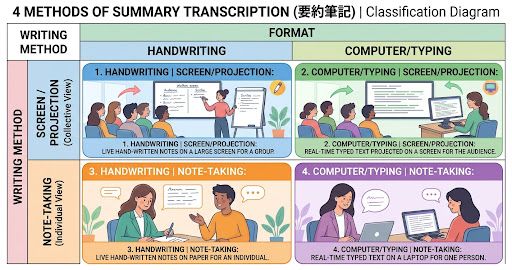
Japan has its own service called yoyaku-hikki (要約筆記). The name means summary writing. You may also see it called speech-to-text interpreting in English. It is closest to TypeWell and C-Print, because the writer picks the key points and rephrases them in short, clear text, rather than writing every word. Writers are trained, and they are required to keep what they hear confidential.
Common methods in Japan:
- Handwriting projected on a screen: the writer writes on a transparent sheet, and a projector shows it on a big screen. Good for lectures and meetings.
- Computer typing projected on a screen: usually two or three people take turns, so the text can be fuller.
- Note-taking beside you (handwritten or typed): a writer sits next to you for one or two people, for example at a hospital or a small meeting.
Handwriting is slow compared with speech: about 70 to 80 characters a minute, according to materials from Japan’s Ministry of Health, Labour and Welfare. This is why the writer summarizes.
How to request it in Japan:
- Cities and towns dispatch writers under Japan’s Act on Comprehensive Support for Persons with Disabilities. Ask at your city or ward office’s disability welfare counter.
- For personal needs such as hospital visits and official procedures, the service is free in many municipalities. Limits on hours and rules on who qualifies differ by city. Some cities require a physical disability certificate, and some don’t, so it’s worth asking even without one.
- Requests are usually needed a few days ahead. For example, Shinjuku Ward in Tokyo asks for three days’ notice.
- Daily work meetings are usually not covered by city dispatch. At work, you can ask your employer. Since April 2024, private businesses in Japan are required to provide reasonable accommodations for people with disabilities.
For help paying for hearing aids, see our guide on hearing aid subsidies in Japan.
Frequently Asked Questions
Is CART the same as closed captioning?
No. CART is live captioning for classes, meetings, and events, done by a trained person in real time. Closed captions are the text you see on recorded or broadcast video.
Do I need to know sign language?
No. Live captioning is for people who read text. It is often used by people who don’t sign.
Can I use captioning if I wear hearing aids?
Yes. Hearing aids and captions work well together. Hearing aids bring in sound, and captions give you a way to check what you missed. Our hearing aid overview explains how hearing aids work.
Is meaning-for-meaning captioning less accurate?
It has a different goal. It leaves out filler words and condenses what’s said, but it keeps the ideas. If you need exact wording, such as for legal or technical content, ask for verbatim.
Will I get a transcript afterward?
Often, yes. Many providers can produce a transcript, but it depends on the service and the organization. Ask when you book.
What about phone calls?
Live captioning for events is a different service from phone captioning. For phone calls, look into captioned telephone and relay services in your country.
Summary
- Live captioning turns speech into text on a screen, typed by trained people.
- Verbatim (CART, STTR) shows nearly every word. Meaning-for-meaning (TypeWell, C-Print, notetakers) shows the main ideas in shorter text.
- Neither is best for everyone. Choose by situation and by what you find easiest to read.
- AI captions are a good backup, but ask for a trained captioner when the situation matters.
- Ask early, name what you want, and share materials ahead of time.
- Organizers can help by booking early, sending materials, speaking one at a time, and planning breaks.
- In Japan, the similar service is yoyaku-hikki, requested through your city office.
If following conversations is getting tiring, you’re not being difficult. Asking for support is a normal, reasonable step.
References
- DCMP (Described and Captioned Media Program). Speech-to-Text Services: An Overview of Real-Time Captioning (2015). https://dcmp.org/learn/static-assets/474_speech-to-text-servicesan-overview-of-real-time-captioning.pdf
- Hands & Voices. Communication Considerations A–Z: Speech-to-Text Services. https://handsandvoices.org/comcon/articles/speechtotext.htm
- RIT/NTID. C-Print: Common FAQ. https://www.rit.edu/ntid/cprint/support/common-faq
- TypeWell. What is the difference between transcribing and captioning? https://typewell.reamaze.com/kb/general-questions/what-is-the-difference-between-transcribing-and-captioning
- ADA.gov. ADA Requirements: Effective Communication. https://www.ada.gov/resources/effective-communication
- National Association of the Deaf. Model language on effective communication. https://www.nad.org/wp-content/uploads/2020/06/Parole-and-Probation.pdf
- RNID. Speech-to-text reporters. https://rnid.org.uk/employers-and-professionals/providing-communication-support/speech-to-text-reporters/
- RNID. Notetakers. https://rnid.org.uk/?p=17439
- Hearing Link. Communication support. https://hearinglink.org/living/rights-benefits/communication-support
- Job Accommodation Network. Employees with Hearing Loss (AskJAN.org).
- Japan Ministry of Health, Labour and Welfare. Report on the expertise of yoyaku-hikki writers (in Japanese). https://www.mhlw.go.jp/content/12200000/000307918.pdf
- Shinjuku City. Dispatch of yoyaku-hikki writers (in Japanese). https://www.city.shinjuku.lg.jp/fukushi/file06_04_00040.html

コメント